
Ollama
The Ollama page manages models across your Home. Admins can manage the runtime and models. Inference users can use available models but cannot administer the Device.
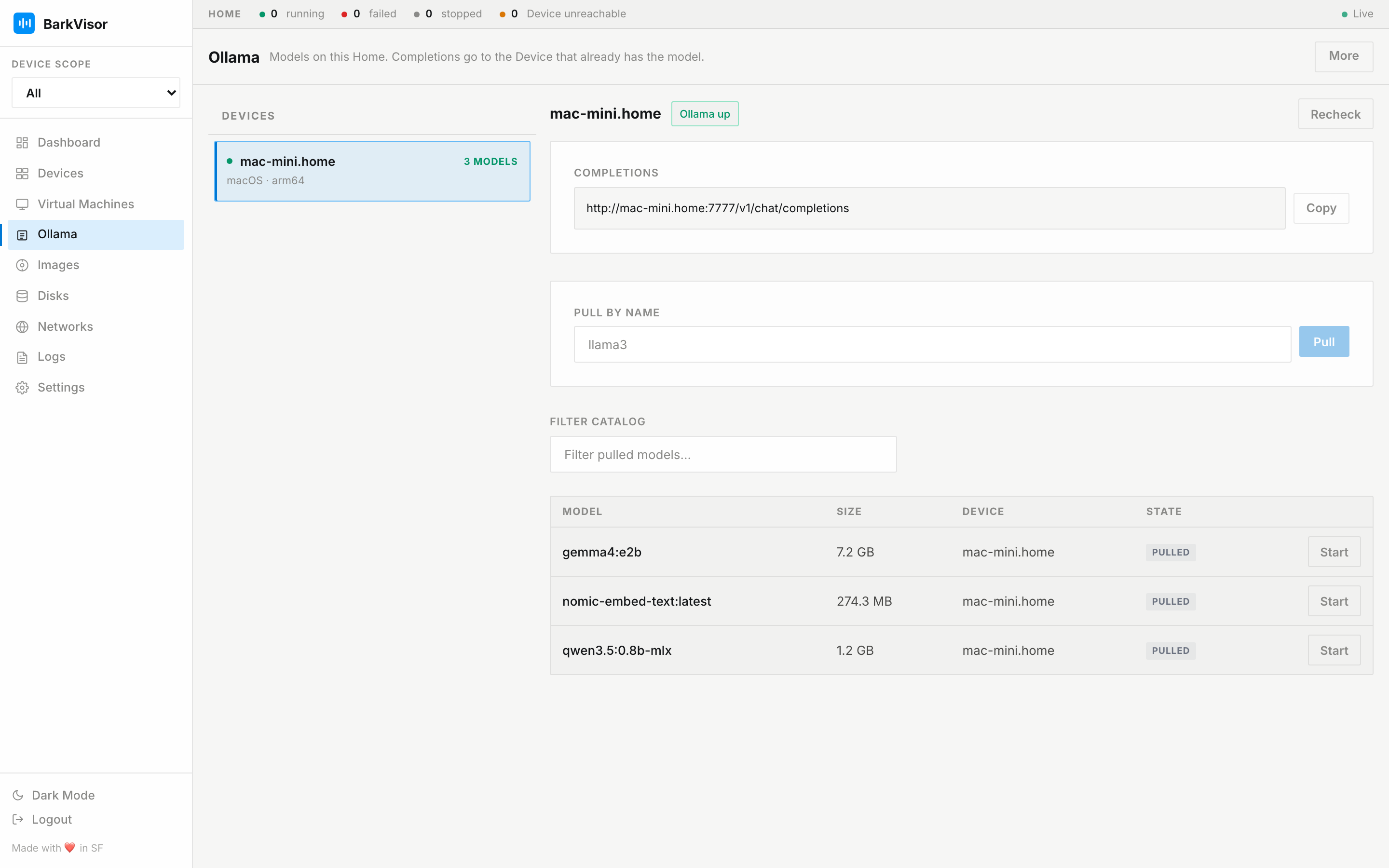
Picking a Device
Section titled “Picking a Device”The left panel lists Devices, whether Ollama is reachable, and how many models are downloaded. Select a Device to see its models.
Status and models
Section titled “Status and models”The right pane shows:
- A status chip with a Recheck button to re-detect the runtime now
- The Completions endpoint for this Home (
/v1/chat/completions) with Copy - Pull by name as a fallback when you already know the model slug
- Filter catalog to match names already pulled on the Home
- The model table on that Device (Model · Size · Device · State) with per-row Start; starting a model that lives on several Devices offers a Device picker limited to Devices that have it
For installing Ollama itself, pulling models, and how completions route through the Home, read the Ollama guide.
Completions
Section titled “Completions”The inspect pane shows the Home completions URL (/v1/chat/completions). Inference keys live under Settings → API Keys.
Export
Section titled “Export”Choose More → Export JSON to download a snapshot of the current model status. This is hidden when no Device is reachable.